
By Nishan Amin · Sep 30, 2026 · Updated Nov 9, 2026 · 12 min read
It is a Friday before a sold-out weekend. The last king room sells on one OTA. Two minutes later, another guest books the same room on a second channel. Your PMS now shows two confirmed stays and one physical key.
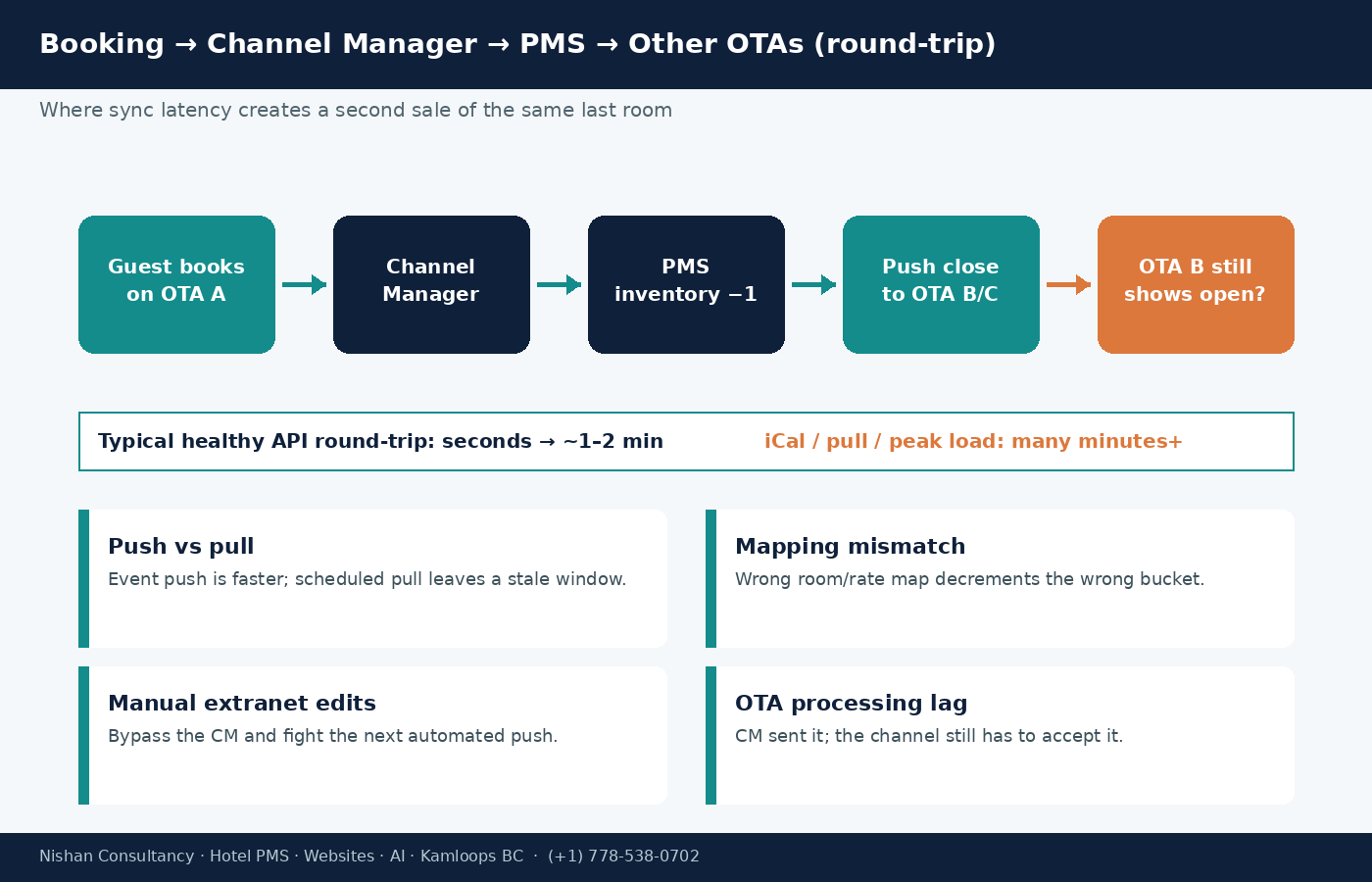
That is not always a “bad vendor.” Often it is channel manager sync delay: the round-trip from booking → channel manager → PMS → every other OTA did not finish before the second sale closed.
Independent hotels feel this harder than chains. You run lean teams, lean room counts, and lean buffers. One last-room race night can mean a walk, a refund, a bad review, and a morning spent reconstructing timestamps instead of greeting arrivals.
This piece explains the real mechanics — push vs pull, iCal vs API, mapping, and OTA-side lag — how to tell latency from human error, and what a GM or ops lead can check this week. No fake guarantee that overbookings “never happen.”
What a channel manager is actually doing
A channel manager sits between your property management system (PMS) and your distribution: OTAs, often your booking engine, sometimes GDS or metasearch. Its job is to keep availability, rates, and restrictions consistent everywhere, and to bring reservations back into the PMS.
When it works, one inventory pool drives every channel. When a booking lands anywhere, that pool decrements and other channels close or reduce count. When it lags, two channels briefly sell the same last unit.
Trade and vendor write-ups from HotelTechUpdate, Smartness, Amenitiz support, AirHost, and Areca’s 2026 channel-management guides describe the same pattern: the second booking arrives inside the sync window, before the first decrement is visible everywhere.
Why does your PMS need a channel manager?
Short answer: Your PMS knows which rooms you have. A channel manager is what tells every OTA. Without one, each booking on Booking.com, Expedia or Airbnb has to be closed out by hand on every other channel, and the gap between those edits is when the same last room sells twice. It automates that close-out and brings reservations back into the PMS.
Cloudbeds describes the core job the same way: update availability and rates across connected channels whenever there is a booking or cancellation, and import reservations and cancellations back into the PMS over a two-way connection. Doing that by hand across three or four extranets is slow on a normal day and risky on a sold-out one.
The bigger question for an independent hotel in the US or Canada is where the channel manager lives:
- Built into the PMS. Cloudbeds sells its channel manager as part of its platform and lists 450+ connected channels on its product page. Mews launched Mews Channel Manager, powered by SiteMinder, on August 17, 2026; Mews says Booking.com, Expedia and Airbnb for Hotels are standard, with a Pro tier for its 400+ channel network and a phased rollout for properties already on SiteMinder.
- A separate channel manager connected to the PMS. This is the classic setup: the channel manager talks to the PMS through an interface and to the OTAs on the other side. Mews, for example, documents a two-way Channel Manager API for third-party connections.
Either setup can work. What causes overbookings is usually not the choice itself but an unclear one: some channels on the built-in tool, others on a separate tool, and staff still editing extranets directly.
How to check your setup
List every channel you sell on. Next to each, write which system connects it (PMS built-in, separate channel manager, or manual extranet) and whether it is API or iCal. Any channel with two answers, or with “manual”, is where to start.
The vulnerable round-trip
The risky path is not “update one screen.” It is a full cycle:
- Guest books on OTA A.
- Reservation travels to the channel manager.
- Channel manager writes into the PMS (or the CM is the inventory brain, depending on stack).
- Decremented availability must push out to OTA B, OTA C, and your direct engine.
- Each OTA still has to accept and process that update on its side.
HotelTechUpdate’s August 2026 guide puts the practical range bluntly: under normal load, practitioners often see a few seconds to a couple of minutes for that cycle — and longer under peak demand, outages, or throttling. On a high-demand, low-availability night, a two-minute gap is enough for two guests to take the same room.
AirHost’s public sync-interval docs refuse the “real-time everywhere” myth: import intervals vary by OTA (their table lists examples from about 1 minute to about 10 minutes, with some marked immediate). Two confirmations inside the same interval can double-book — an inherent sync limitation, not unique to one product. Treat that table as vendor documentation for that stack, not a universal scoreboard. The lesson: channels do not all close at the same speed, and “connected” is not the same as “instant.”
Push vs pull, API vs iCal
Push (event-based) vs pull (scheduled)
- Push: when inventory changes, the channel manager or OTA sends an update. Faster in principle — queues, rate limits, and partner processing still remain.
- Pull: a system polls on a timer. Between polls, an OTA can sell against stale availability.
API vs iCal
Areca’s 2026 beginner guide and iCal-vs-API posts draw a sharp operator distinction: iCal is typically a delayed calendar pull (often 15+ minutes) and mostly moves availability; certified API connections are push-oriented, can move rates, restrictions, and bookings (per integration), and close the last-room window to seconds when healthy — not to zero risk.
Amenitiz’s availability troubleshooting guide matches that operationally: iCal connections refresh on a slower cadence and often do not import bookings or sync restrictions the way XML/API connections do. Unmapped or newly created OTA rate plans that never get linked are a classic double-booking cause — the OTA can sell a rate that never reduces inventory in the PMS/CM.
Honest caveat: no reputable source promises zero overbookings. Smartness notes that even a fast CM send still depends on OTA-side processing. Outages, bad mapping, and manual extranet edits still create conflict.
Five causes that look like “the channel manager is broken”
1) Round-trip latency on the last room
Zero buffer + high booking velocity + multi-OTA distribution = race condition. This is sync delay in the pure sense.
2) Room or rate mapping mismatch
If a “King Garden” in the PMS is mapped to the wrong OTA room type or an unlinked rate plan, updates decrement the wrong bucket — or none. Help docs across Amenitiz and similar systems repeat the warning: unmapped rates keep selling while inventory elsewhere never moves.
3) Manual changes in an OTA extranet
Staff close or open rooms, tweak rates, or set stop-sells directly in an OTA backend. Those edits can fight the next automated push, or leave one channel as a private source of truth. Pick one system of record for inventory and rates (usually PMS or CM) and stick to it.
4) One-way or partial connections
Trade explainers on two-way vs one-way PMS integration stress the gap: bookings may flow in while PMS blocks, maintenance closes, or group allotments never flow back out. Overbooking risk remains even if “we have a channel manager.”
5) OTA rate limits, peak load, and caching
API rate limits queue updates. Peak event nights slow imports. Sometimes the extranet is correct while the guest-facing page lags — confirm with the channel if shopper view and extranet disagree.
How to diagnose: timestamps, not vibes
Before you rip out a vendor, prove the mechanism.
- Pull both conflicting confirmation timestamps (OTA A and OTA B).
- Pull the channel manager activity / update log for the inventory decrement and outbound pushes.
- Check PMS booking create time and room-type counts for that night.
- Ask: did the second booking land inside the sync window, before the other channel acknowledged a close?
HotelTechUpdate’s diagnostic rule of thumb: if both bookings landed inside the sync window and the second channel never received the decrement in time, you have a latency-driven overbooking. If your CM does not expose usable logs, that opacity is itself a risk signal.
Pattern check: sync-driven overbooks cluster on last-room nights, event / holiday pace spikes, slower or iCal channels, and around manual extranet edits. Random, evenly distributed conflicts more often point to process or mapping, not pure latency.
What to do this week (GM / ops checklist)
These are operator moves, not a rip-and-replace project.
- Inventory audit per channel connection type. For each OTA: API/XML vs iCal? Two-way? Who owns rates? Prefer certified API on the channels that actually drive volume.
- Mapping sweep after any structural change. Renamed rooms, new rate plans, new listings — re-check room and rate maps 1:1. Unmapped OTA rates are silent overbooking machines.
- Stop dual editing. Inventory and rates change in the PMS/CM only. Extranet edits need a named exception and a forced resync afterward.
- Use a small, intentional buffer on high-risk nights. AirHost explicitly recommends holding one room back (or limiting live OTA count) during exceptionally high volume. Trade-off: buffered rooms can go unsold. Apply buffers on peak nights, not forever.
- Force a controlled test. After any CM/PMS change, verify a booking on one channel reduces others within your expected window. One clean manual push after a reconnect is fine; spamming resyncs usually means mapping/config, not “try harder.”
- Turn on failure alerts someone actually reads. Rejected updates and disconnected OTAs should page ops — not sit in a vendor log nobody opens.
- Walk playbook ready before the weekend. Who calls the guest, who finds the walk hotel, what you compensate, how you document both reservation IDs and timestamps for vendor escalation.
Cloudbeds overbooking fix: what to check first
To fix overbookings in Cloudbeds, start with three checks: make sure Allow Overbookings is off in the Availability Matrix overbooking settings, map every room type one-to-one to each OTA, and stop editing inventory in the OTA extranets. If double bookings continue, compare the timestamps of both reservations to see whether sync lag caused them.
Cloudbeds overbooking checklist
- Allow Overbookings is off (Availability Matrix, Settings, Overbooking Settings). Cloudbeds says it isn’t recommended for most properties.
- Full-occupancy setting checked: “Allow additional bookings when property is at full occupancy” (System, Preferences tab). With it off, Cloudbeds sends 0 availability to connected channels at 100% occupancy.
- One-to-one room type mapping for every OTA. No room type mapped to several OTA rooms, or several to one.
- No dual editing. Inventory and rates change in Cloudbeds only, not in the Booking.com or Expedia extranets.
- Test after any change. Make one test booking and confirm the other channels close within your expected window.
- Third-party sources watched. Cloudbeds notes these can still create overbookings regardless of the occupancy setting.
Source: Cloudbeds help centre: Overbooking features. Details for each setting are in the next section.
Using Cloudbeds? Overbooking settings to check
If your PMS is Cloudbeds, check its own overbooking settings before you blame sync speed. Cloudbeds documents two options (Cloudbeds help centre):
- Allow additional bookings when property is at full occupancy (System, Preferences tab). With it off, Cloudbeds says it sends 0 availability for all room types to the channel manager and connected channels once the property is at 100% occupancy.
- Allow Overbookings (Availability Matrix, Settings, Overbooking Settings). Cloudbeds says this isn’t recommended for most properties. Keep it off so the amount allotted for sale can’t go above your remaining inventory.
- Third-party sources. Cloudbeds notes that reservations from third-party sources can still create overbookings regardless of the first setting, so mapping and sync health still matter.
- Room mapping. Cloudbeds strongly recommends one-to-one room type mapping (Cloudbeds help centre). Our Cloudbeds channel manager setup help page covers the mapping mistakes we see most.
If overbookings keep happening after these checks, the next place to look is the channel mapping and the connection type for each OTA.
Cloudbeds help
Need hands-on Cloudbeds help?
We’re an independent Cloudbeds consultant for small hotels: setup help, Booking.com, Expedia and Airbnb mapping, overbooking fixes and remote staff training. We’re not a Cloudbeds partner; we do the hands-on work with your team.
Cloudbeds consultant for small hotels · Cloudbeds channel manager setup help
30-minute call · Free until Nov 30, 2026 (regularly $200) · Prefer email? info@nishanconsultancy.com
If you want a structured pass across PMS + up to five OTA maps, Nishan Consultancy’s free PMS audit and PMS Issues & Engineering work are built for channel sync, mapping cleanup, and overbooking prevention rules — without pretending a tool will never fail.
Sync latency is different from brand-search hijacking or a weak website path: you can fix SEO and still walk a guest if the last room races across channels. Treat sync health as ops reliability, not marketing.
FAQ
Can a channel manager prevent every overbooking?
No. Fast two-way API sync, correct mapping, and clear alerts reduce risk a lot. OTA processing lag, outages, human extranet edits, and last-room races can still collide. Anyone promising “never” is selling comfort, not operations.
Is two-way sync enough by itself?
Two-way is necessary, not sufficient. You still need correct maps, monitored failures, sensible buffers on peak nights, and a team that does not fight the CM from five extranets.
What is the first thing to check after a double booking?
Timestamps and maps — then guest care. Fix the guest first, then prove whether latency, mapping, iCal delay, or a disabled overbooking safeguard caused it.
How do I stop overbookings in Cloudbeds?
Start with Cloudbeds’ own settings: keep “Allow Overbookings” off in the Availability Matrix unless you really want it, decide whether “Allow additional bookings when property is at full occupancy” should be on, and check that every channel’s room types map one-to-one. Then test that a booking on one channel closes the others. Reservations from third-party sources can still overbook, so watch mapping and sync alerts too.
Do I still need a separate channel manager if my PMS has one built in?
Usually not. Cloudbeds and Mews both publish built-in channel managers that sync rates, availability and reservations with Booking.com, Expedia, Airbnb and many more channels. A separate channel manager makes sense mainly when a channel you need is not on your PMS’s list or your plan. Running two systems against the same OTA invites double editing and mapping conflicts.
Bottom line
Independent hotels still overbook with “a channel manager installed” because installation is not the same as a healthy round-trip. Push vs pull, API vs iCal, mapping, manual edits, and OTA-side processing all widen or shrink the window where two guests can buy the same last room.
This week: document connection types, fix maps, stop dual editing, buffer peak nights deliberately, and test that a booking on one channel actually closes the others. When you want a specialist to pressure-test the stack, contact Nishan Consultancy at info@nishanconsultancy.com.
Sources for mechanisms and vendor-documented intervals (not Nishan client results): HotelTechUpdate; Smartness; AirHost sync intervals; Amenitiz sync troubleshooting; Areca 2026 channel management guide; Areca iCal vs API; AxisRooms two-way vs one-way; Cloudbeds Channel Manager and Mews Channel Manager product pages, Mews Community launch post (Aug 19, 2026) and Mews Channel Manager API docs (all retrieved Nov 9, 2026).