
By Nishan Amin · Nov 2, 2026 · 12 min read
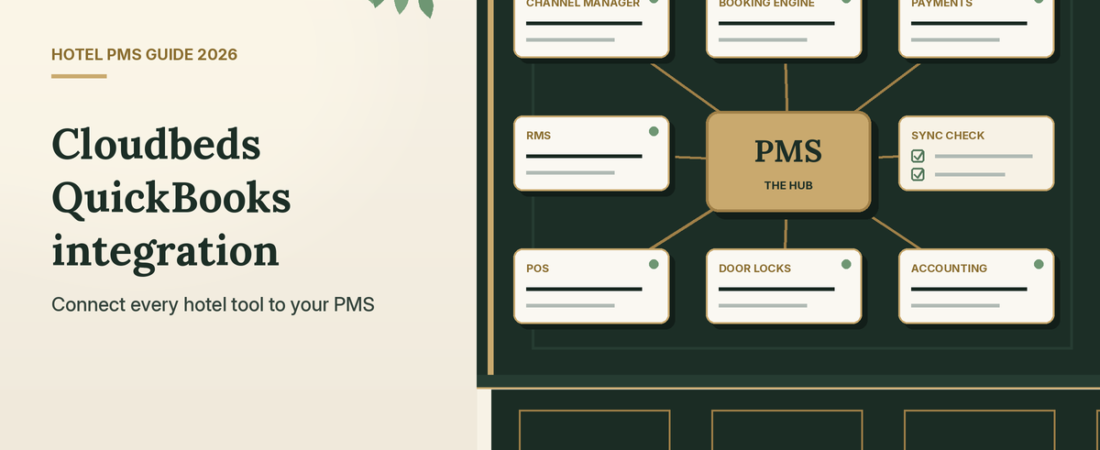
A small hotel can easily run six or seven systems: the PMS, a channel manager, a booking engine, a payment processor, a restaurant POS, door locks and an accounting package. Each one works on its own. The trouble starts when they have to share reservations, charges and money, and nobody is sure which system is the source of truth.
This guide is for independent hotels in the US and Canada. It maps the common PMS integrations, explains how Cloudbeds, Mews and Oracle publish their marketplaces and APIs, walks through a Cloudbeds QuickBooks integration as a worked accounting example, and ends with a test plan and an escalation path. Vendor details come from public vendor pages, retrieved Nov 2, 2026.
Key takeaway
Treat the PMS as the hub. Connect each tool through the vendor’s own marketplace app or published interface, map codes before you switch it on, and test every connection with a real booking before you trust it.
How do I connect all my hotel tools to my PMS?
Make the PMS the hub, then connect each tool through an integration your PMS vendor lists or documents, such as a marketplace app, an interface or an API. Map rates, rooms, charge codes and accounts first, switch on one connection at a time, and test each with a real booking before relying on it.
Everything else follows from that. The PMS holds the reservation, the folio and the room status, so other systems should read from it and post back to it, not keep their own copy. When two systems both think they own the same data, you get double bookings, missing charges and numbers that never tie out.
1The integration map: what connects to your PMS
Most independent hotels need the same core connections. What changes is which vendor you use for each, and whether the connection is built in, a marketplace app or a custom build.
| System | What it exchanges with the PMS | What breaks when it’s wrong |
|---|---|---|
| Channel manager | Rates, availability and restrictions out; OTA bookings in | Overbookings, wrong rates on Booking.com or Expedia |
| Booking engine | Rates and availability out; direct bookings and deposits in | Website shows rooms you don’t have, or bookings arrive late |
| Payments | Card tokens, charges, refunds and payouts | Folio balances that don’t match the bank |
| POS (restaurant, bar, spa) | In-house guest lookup; charges posted to the folio | Room charges missing at check-out |
| Door locks and kiosks | Room, stay dates and status; keys or codes back | Keys that don’t open, or open after check-out |
| Revenue management (RMS) | Occupancy and pace out; rate recommendations in | Prices set from stale data |
| Accounting | Daily revenue, taxes, payments and deposits | Month-end that doesn’t reconcile |
Channel manager and booking engine. These carry inventory, so they matter most. A mapping mistake here sells rooms you don’t have. Our guides to channel manager sync delays and overbookings, connecting Airbnb, Expedia and Booking.com to your PMS and how your PMS connects to your website booking engine cover these in depth.
POS. A POS integration usually looks up in-house guests and posts charges to the room folio. Cloudbeds’ POS directory describes most of its apps this way, with differences that matter: some post per item, some post the bill total, some can also post to a house account, and one notes items arrive tax-inclusive with no tax breakdown. [7] Ask how taxes and voids are posted before you choose.
Door locks. Cloudbeds splits door lock integrations into two types. With API or smart-access integrations, the partner pushes occupancy events back and the reservation status updates automatically. With encoder-style integrations, staff must change the status to In-House by hand. [8] That one detail changes your front desk routine, so confirm which type you are buying.
Accounting. Accounting links usually send summarized daily journals rather than every transaction. That is fine for bookkeeping, but it means you reconcile totals, not individual folios. The worked example below shows what that looks like in practice.
2Marketplaces and APIs, as each vendor publishes them
Before buying any add-on, check whether your PMS vendor already lists it. A listed integration has a documented setup path and a named support contact. A custom build puts the maintenance on you.
Cloudbeds. Cloudbeds describes its platform as open, with a documented API, GraphQL, real-time webhooks and 450+ integration partners. [1] Partner apps are connected from Apps & Marketplace inside the PMS, [3] and the Cloudbeds help center keeps category directories, for example point of sale, door locks and accounting, that list each app’s status, region, integration guide and support contact. [5] [7] [8] Check the status column: some apps are marked on hold and not accepting new properties. [5]
Mews. Mews advertises its Marketplace as “1,000+ integrations. No connection fees.” [9] For custom work, Mews publishes the Connector API, a general-purpose API for Mews partners, with API operations, webhooks and an OpenAPI definition. [10]
Oracle OPERA. Oracle Hospitality Integration Platform (OHIP) is Oracle’s self-service way to use OPERA Cloud APIs, subscribe to business events and register applications, and partners list apps on Oracle Marketplace. [11] Oracle states that new integrations are not available to OPERA 5, including on-premises and hosted deployments, and that APIs for legacy integration methods are on docs.oracle.com. [11]
For OPERA 5 hotels, existing property interfaces run through IFC8. Oracle’s OPERA 5.6 documentation lists interface types including Door Lock System (DLS), Point of Sale (POS), Telephone PABX (PBX), Electronic Fund Transfer (EFT) and Minibar (MBS), [12] and describes IFC8 as a bridge that converts vendor messages to XML and passes them to the IFC8 Controller. [13] If you plan a new tool on OPERA 5, ask the vendor which supported method it uses before you sign. See our Opera PMS consultant page for OPERA 5 support.
| Cloudbeds | Mews | Oracle OPERA | |
|---|---|---|---|
| Where integrations are listed | Cloudbeds Marketplace and help-center app directories [2] [5] | Mews Marketplace [9] | Oracle Marketplace (OPERA Cloud) [11] |
| Published API | Open API, GraphQL and webhooks [1] | Connector API with webhooks [10] | OHIP for OPERA Cloud; IFC8 interfaces documented for OPERA 5 [11] [12] |
| Vendor’s published scale | 450+ integration partners [1] | 1,000+ integrations [9] | Not stated as a count on the OHIP page [11] |
Worked example: the Cloudbeds QuickBooks integration
Accounting is a good test case because the numbers have to tie out to the cent. Cloudbeds’ QuickBooks Online listing names a direct, built-in connection, “QuickBooks by Cloudbeds”, and a third-party option, QuickBooks by The Percentage App. [2] Its accounting directory also lists a Xero Sync by The Percentage Company, an M3 integration with its region given as United States and Canada, and other apps. [5]
Cloudbeds documents the setup of its own QuickBooks connection as: open Apps & Marketplace, connect the app, sign in to QuickBooks, then go to Accounting, map each transaction category to a QuickBooks account on the Mappings tab and click Sync to QuickBooks. [3] Configuration areas include Items & Services, Reservations, Taxes & Fees, Payments, Accounts Receivable and Advanced Deposit. [4]
Four details from Cloudbeds’ documentation shape how you check it: [4]
What the Cloudbeds QuickBooks integration sends
- Journal entries carry a summarized balance per account, not detailed transactions.
- Each journal covers one day. A late sync creates one entry per unsynced day.
- Cash Drawer transactions are not included.
- For Cloudbeds Payments users, the full folio payment is sent, not the net bank deposit, and processing fees are not sent. Cloudbeds recommends the Transactions Report, not the Payout Report, to verify the sync.
Cloudbeds also warns that if QuickBooks is enabled before historical reservations are imported, the imported transactions are treated as new and synced, so accounting syncs should be disabled before any import. [3] That matters during a PMS migration.
Taxes need the most care. A US property may collect state sales tax plus city or county lodging tax; a Canadian property may collect GST or HST, provincial tax and a municipal accommodation tax. Map each tax to its own liability account in QuickBooks rather than one combined line, so filings are easy to prove. Our Canadian PMS tax setup guide covers the Canadian side; confirm rates and accounts with your accountant.
If you don’t want a live sync, Cloudbeds documents other routes: premade and custom report exports, a Payment Ledger export prepared as CSV for a manual QuickBooks import, or the Cloudbeds API for a custom build. It notes there is no single universal export button for every accounting system. [6]
3Which integrations to test first, and how
Test in order of risk. Anything that changes inventory or money comes first; anything that only reads data can wait.
| Order | Integration | Why first |
|---|---|---|
| 1 | Channel manager | Wrong inventory sells rooms you don’t have |
| 2 | Booking engine | Direct bookings and deposits land in the PMS |
| 3 | Payments | Card charges and refunds affect real money |
| 4 | POS and door locks | Affect guests in-house and at check-out |
| 5 | Accounting | Errors stay hidden until month-end |
| 6 | RMS, reporting and guest messaging | Mostly read data; errors are easier to spot |
Generic test plan for each new connection
- Write down which system owns each piece of data: rates, inventory, the reservation, the folio, the payment.
- Map codes before go-live: room types, rate plans, transaction or charge codes, taxes and accounts.
- Connect in a test or sandbox environment if the vendor offers one. Oracle, for example, describes a shared sandbox for OHIP development. [11]
- Create one test booking and follow it end to end: booking, modification, cancellation, charge, refund, check-out.
- Post one POS charge to a test room and confirm the amount, tax and description on the folio, then void it. [7]
- Issue a key or code, check in, check out, and confirm the reservation status updates as the vendor describes. [8]
- Run the first accounting sync for a single day and compare it with the PMS report the vendor recommends. [4]
- Record the vendor’s support contact and integration guide for each app in one shared document.
✓ How to check
After go-live, compare one day’s PMS totals with each connected system every morning for the first week. A gap on day one is a mapping issue; a gap that appears later is usually a sync or status issue.
4Who owns the fix when two vendors blame each other
When a charge is missing or a booking didn’t arrive, the PMS vendor often points at the partner, and the partner points back. The way through is evidence, not argument.
Before you open a ticket
- Find the exact record: booking ID, room, date, time and amount.
- Check whether the record left the source system, for example the POS check or the OTA booking.
- Check whether it arrived in the PMS, and on which folio or reservation.
- Check the integration’s own log or sync history. Cloudbeds’ QuickBooks connection, for example, has a Sync History tab with summary and detailed exports. [3]
- Open one ticket with the side where the record stopped, and copy the other vendor in with the same evidence.
Each Cloudbeds directory row names a support contact for that app, which tells you who supports the connection. [5] [7] [8] For marketplace apps, the partner usually owns its side; for anything custom-built, you or your developer own it.
Escalate to someone who can see the whole chain when the same problem keeps coming back, when the fix touches mapping in more than one system, or when a migration is planned. That is what our PMS issues engineering service and our Cloudbeds consultant page cover, including the Cloudbeds QuickBooks integration.
Frequently asked questions
Does Cloudbeds integrate with QuickBooks?
Yes. Cloudbeds’ QuickBooks Online listing names a direct, built-in connection and a third-party option from The Percentage App. Cloudbeds documents connecting from Apps & Marketplace, then mapping each transaction category to a QuickBooks account before syncing.
Does Cloudbeds integrate with Xero?
Cloudbeds’ accounting directory lists Xero Sync by The Percentage Company, which reads Cloudbeds transaction data, maps it and posts it to Xero. It notes this does not include data posted by other third-party apps such as POS integrations, and that The Percentage Company handles support.
Can I build new integrations for OPERA 5?
Oracle states that new integrations are not available to OPERA 5, including on-premises and hosted deployments, and that APIs for legacy integration methods are on docs.oracle.com. Its Hospitality Integration Platform is for OPERA Cloud.
How many integrations do Cloudbeds and Mews have?
As each vendor publishes it, retrieved Nov 2, 2026: Cloudbeds cites 450+ integration partners on its API page, and Mews advertises 1,000+ integrations with no connection fees on its Marketplace page.
Which hotel integration should I test first?
Start with whatever changes inventory or money: the channel manager, then the booking engine and payments. Follow one test booking end to end, including a change, a cancellation, a charge and a refund, before trusting the connection.
Integrations not talking to each other?
Our free audit reviews your PMS configuration, channel mapping across up to 5 OTAs and rate parity, so you know which connection to fix first.
30-minute call · Free until Nov 30, 2026 (regularly $200)
Prefer email? info@nishanconsultancy.com
Sources
- Cloudbeds API, webhooks and 450+ integration partners: Cloudbeds: Cloudbeds API (retrieved Nov 2, 2026)
- Cloudbeds QuickBooks Online connection options: Cloudbeds Marketplace: QuickBooks Online (retrieved Nov 2, 2026)
- Connecting and mapping QuickBooks, Sync History, imports: Cloudbeds: How to connect QuickBooks to Cloudbeds PMS (retrieved Nov 2, 2026)
- What the QuickBooks sync sends and how to verify it: Cloudbeds: QuickBooks, everything you need to know (retrieved Nov 2, 2026)
- Accounting app directory (Xero, M3, statuses, support): Cloudbeds: Accounting and Finance Apps (retrieved Nov 2, 2026)
- Export routes to external accounting systems: Cloudbeds: Export financial data to an external accounting system (retrieved Nov 2, 2026)
- POS apps and how charges post to folios: Cloudbeds: Point of Sale Apps (retrieved Nov 2, 2026)
- Door lock integration types and status updates: Cloudbeds: Access Management and Door Locks Apps (retrieved Nov 2, 2026)
- Mews Marketplace, 1,000+ integrations, no connection fees: Mews: Marketplace (retrieved Nov 2, 2026)
- Mews Connector API (vendor documentation): Mews: Connector API (retrieved Nov 2, 2026)
- OHIP, Oracle Marketplace, sandbox, and OPERA 5 limits: Oracle: Hospitality Integration Platform (retrieved Nov 2, 2026)
- OPERA 5.6 interface types (vendor documentation): Oracle: Configuring New Interfaces (retrieved Nov 2, 2026)
- OPERA 5.6 IFC8 (vendor documentation): Oracle: Understanding the IFC8 Program (retrieved Nov 2, 2026)